ZTBrowser ZT Browser

Free, Clean, Ad-Free

Cryptographic Agility. Visible Security. Digital Trust.

Multi-Algorithm Support
RSA ▪ ECC ▪ SM2 ▪ PQC
Visible Website Identity
https ▪  m ▪  m ▪  m ▪ T1-T4
Trusted PDF Reading
cert ▪  lock ▪  time ▪  m ▪ T1-T4

Why ZT Browser?

A familiar browsing experience is not the whole story. As cryptographic standards evolve and online threats become more sophisticated, users need more than an encrypted connection: they need the ability to understand the security technologies in use and assess who is behind the websites and documents they access. ZT Browser builds on Chromium and adds focused capabilities for RSA/ECC/SM2 cryptography, post-quantum cryptography readiness, visible website identity, Certificate Transparency, and PDF document signature verification. It is designed to make important security information more accessible without requiring users to become cryptography experts.

Cryptographic Agility

Across RSA, ECC, and SM2, and two Hybrid PQC.

Visible Indicators

For HTTPS connection and website security properties.

Website Identity

Display Website identity based on SSL certificate type.

Clear CT Info

Display Certificate Transparency information details.

Built-in PDF Reader

With digital signature verification and trusted signer identity display.

Cryptographic Agility & Resilience

Cryptographic technologies continue to evolve. A browser should be prepared to work with established algorithms today while supporting the transition to new cryptographic approaches. ZT Browser is designed around cryptographic agility: the ability to adopt, support, and transition between cryptographic algorithms as standards, infrastructure, and security requirements evolve. This contributes to cryptographic resilience, the ability to maintain security and service continuity through cryptographic change.

ZT Browser supports cryptographic algorithm families including RSA, ECC, and SM2. And two hybrid post-quantum key exchange: X25519MLKEM768, SM2MLKEM768, that combine classical and post-quantum cryptographic components.

Protocol TLS 1.3
Key exchange X25519MLKEM768
Server signature RSA-PSS with SHA-256
Cipher AES_128_GCM
Protocol TLS 1.3
Key exchange SM2MLKEM768
Server signature SM2 with SM3
Cipher SM4_GCM
Protocol TLS 1.3
Key exchange X25519
Server signature RSA-PSS with SHA-256
Cipher AES_256_GCM
Protocol TLS 1.3
Key exchange X25519
Server signature ECDSA with SHA-256
Cipher AES_128_GCM
Protocol TLS 1.3
Key exchange SM2
Server signature SM2 with SM3
Cipher SM4_GCM
Protocol TLS 1.2
Key exchange ECDHE_RSA with P-256
Server signature RSA-PSS with SHA-256
Cipher AES_128_GCM

Make Website Security Visible

An HTTPS connection helps protect data in transit, but encryption alone does not tell users everything about the identity of a website. The familiar security indicator should not be mistaken for proof that a site belongs to a particular bank, company, or government organization. ZT Browser adds visible indicators to help users understand more security properties of the current website and HTTPS connection.

https

Indicates that the current connection uses HTTPS encryption.

https

Indicates that the current HTTPS connection uses a supported hybrid PQC.

https

Indicates that the current HTTPS connection uses SM2 algorithm.

https

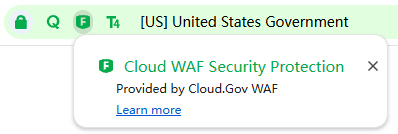
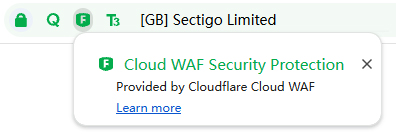
Indicates that the website has been identified as using WAF protection.

Know Who Is Behind the Website

A website can use HTTPS without proving that it belongs to the organization a visitor expects. ZT Browser helps make certificate-based website identity information more visible by recognizing certificate types from the relevant certificate Object Identifiers (OIDs).

T1
<Domain Validated>

DV (Domain Validated)
Gray address bar

T2
[CN] Richard Wang

IV (Individual Validated)
Light green address bar

T3
[CN] ZoTrus Technology Limited

OV (Organization Validation)
Light green address bar

T4
[CN] ZoTrus Technology Limited

EV (Extended Validation)
Green address bar

These website identity types are identified in accordance with the CA/Browser Forum SSL Baseline Requirements. ZT Browser uses the relevant OIDs to identify the certificate type and presents it through the T1–T4 visual indicators. T1–T4 are ZT Browser visual identity indicators; they are not level names independently defined by the CA/Browser Forum.

Visible identity information can help users distinguish domain-validated websites from certificates that provide individual, organization, or extended validation information. It can support more informed decisions when visiting websites that claim to represent banks, businesses, or public institutions.

Website Identity Validation: Filling the Identity Validation Gap in DV CertificatesKeep DV. Make Website Identity Visible.

DV SSL certificates make HTTPS deployment simple and efficient through automation. They provide encrypted connections and validate domain control. However, DV certificates do not validate the real-world identity of the individuals or organizations operating a website. Users cannot determine who is behind a website based on a DV certificate alone.

With the ZoTrus Website Trusted Identity Validation Service, both individuals and organizations can apply for trusted website identity validation. Websites can retain their DV SSL certificates while obtaining independent identity validation. Once validated and recognized by ZT Browser, the Browser can display the corresponding identity validated level, validated individual or organization name, and associated address bar appearance. This approach preserves the convenience of automated DV certificate deployment while filling the gap in website identity validation.

ZoTrus HTTPS Automation Gateway

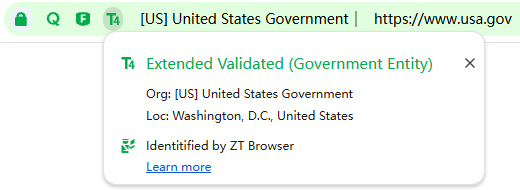
Real-World Example: USA.gov

Let's Encrypt DV SSL Certificate deployed
ZoTrus Trusted Identity Database included
ZT Browser UI: T4 · United States Government · Green Address Bar

And

“Q” indicator means this site is Quantum-Safe
“F” indicator means this site have WAF protection

HTTPS Encryption Protects the Connection. Trusted Identity Reveals Who Is Behind the Website.

Learn More

Certificate Transparency, Made More Transparent

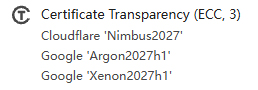
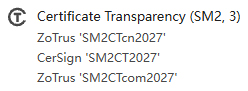
Certificate Transparency (CT) helps make the issuance of publicly trusted certificates more observable. ZT Browser brings CT information together in one interface, helping users inspect certificate transparency details rather than seeing only that CT is present.

By displaying CT Log names and operators, ZT Browser makes certificate transparency information easier to inspect. ECC CT and SM2 CT support helps bring transparency information from both cryptographic ecosystems into the same browsing experience.

CT
CT
CT
CT
CT Signature Algorithm: ECC or SM2
SCT Count: the number of SCT included in certificate
CT Log Names: the names of the CT Logs associated with the SCTs
CT Log Operators: the organizations operating those CT Logs

Know Which CT Logs Recorded the Certificate, and Who Operates Them.


Learn More

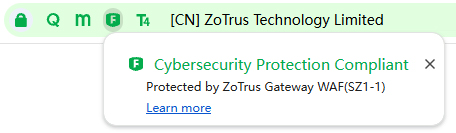
WAF Protection, Visibly Identified

Web Application Firewalls (WAFs) help protect websites by inspecting web traffic and identifying or filtering potentially harmful requests. ZT Browser can visibly identify a website that has been recognized as using WAF protection through the F indicator. The indicator gives users an additional piece of security context while browsing. It is an indication of identified WAF protection, not a guarantee that a website is free from vulnerabilities or attacks.

WAF
CT
WAF
CT
WAF
CT

Know Which Gateway Protects the Website.

When ZT Browser displays “Protected by ZoTrus Gateway WAF (SZ1-1)” (see above first screenshot), it indicates that the website is fronted by a ZoTrus HTTPS Automation Gateway, with protection provided by its built-in WAF. The identifier in parentheses, such as “SZ1-1”, indicates the gateway's deployment location. This makes gateway protection visible and let ZT Browser users see the security behind the website.

Built-in PDF Reader & Digital Signature Verification

PDF files are widely used to exchange business documents, statements, notices, contracts, and official information. A document can display a company name, logo, or image of a seal, but those visual elements alone do not establish who issued the document or whether its content has been altered. ZT Browser includes a built-in PDF reader that brings digital signature verification and trusted signer identity information into the document-reading experience. Its security presentation is designed to align with the identity and signature experience in ZTmail Sign.

Digital Signature

View signature status and verification results, including relevant trust information and document modification status.

Encryption

Identify whether the document is encrypted by certificate and decryption.

Timestamp

View trusted timestamp information associated with the document digital signature.

LTV

Inspect long-term validation information where supported by the document and validation data.

Trusted Signer Identity

Display the signer’s certificate identity validation type using the applicable identity indicators.

SM2 Cryptography

Recognize SM2 digital signatures and support verification of SM2-signed PDF and OFD documents, and SM4 decryption.

Document signer identity trusted levels

T1
<Email Address>

MV (Mailbox Validated)

T2
[CN] Richard Wang

IV (Individual Validated)

T3
[CN] ZoTrus Technology Limited

OV (Organization Validation)

T4
[CN] Richard Wang @ ZoTrus Technology Limited

SV (Sponsor Validation)

For document signer identity, ZT Browser identifies the relevant certificate validation types through the multipurpose certificate Object Identifiers (OIDs) defined by the CA/Browser Forum S/MIME Baseline Requirements (S/MIME BR). The T1–T4 visual indicators in this document-signing context represent MV, IV, OV, and SV respectively.

When a PDF is not digitally signed

“No digital signature, Identity is unknown. Be careful!” This warning means that the publisher’s identity cannot be verified through a digital signature in the document. It does not mean that every unsigned document is fraudulent. Users should exercise appropriate caution, especially when a document claims to come from a bank, company, or government institution. Digital signature verification helps users assess signer identity and document integrity. It can make attempts to impersonate trusted organizations easier to detect.

ZoTrus Trusted Root Program

ZT Browser participates in the ZoTrus Trusted Root Program for SSL certificate trust. The program supports trusted certificate ecosystems for both RSA/ECC and SM2 ecosystem, and includes the intranet SSL certificate.

ZT Browser — SSL certificate trust

RSA/ECC Root Certificate trust listsSM2 Root Certificate trust listsECC CT Log trust listsSM2 CT Log trust lists

The broader ZoTrus Trusted Root Certification Program also serves the ZTmail App ecosystem for email and document certificate trust, including RSA/ECC and SM2 root certificates and trusted timestamping services. ZT Browser focuses on the SSL certificate and website trust components relevant to browsing, the built-in PDF reader uses the document certificate trust and timestamping trust.

Chromium 137

Chromium 137
Built on Chromium,
Enhanced for Digital Trust

ZT Browser is based on Chromium open source project, providing a familiar browser foundation while adding capabilities focused on cryptographic agility, SM2 and post-quantum readiness, visible website identity, Certificate Transparency, and PDF digital signature verification.
It is not intended to replace the familiar web browsing model. It extends that experience with security and trust information that is especially relevant as cryptographic standards and digital identity requirements evolve.

Download ZT Browser Explore a browser that brings cryptographic agility, visible security, and digital trust together.

Mac OS

mac_os
Coming Soon

Android

Android
Coming Soon

Apple iOS

Apple IOS
Coming Soon