ZTmail Sign
Document Signing, Simplified
Sign and verify documents — from email attachments to local files.
The document is already in email. Why leave email to sign it? Sign it in email.
Explore Service Details and PricingThe document must leave the email conversation and enter another application or web workspace.
The signing platform normally receives and manages a copy of the document as part of the signing transaction.
Platform signing workflows commonly use platform-managed signing certificate, authentication and trust mechanisms rather than the user's own Document Signing Certificate.
Contract negotiation and discussion remain in email while the actual signing process moves to another system.
The recipient may need the signing platform or its validation workflow to understand the signature and signer information.
The organization must manage another service, account, document lifecycle and access boundary in addition to its existing email infrastructure.
The Six Separation Must Be Fixed for Productivity and Efficiency.
ZTmail Sign extends that existing workflow, combining email and e-document signing into one, all within the same workflow.
Sign the document where it already exists. Right-click a PDF attachment and choose Sign. ZTmail Sign uses the user's configured signing certificate to create the digital signature without requiring the document to be uploaded to a separate signing platform.
The entire contract process can remain in email: discuss terms, exchange versions, confirm the final PDF, sign it, send it back and continue the conversation. After completion, the signed contract can remain as an encrypted email attachment in the user's own mailbox rather than becoming a document managed only through a separate signing platform.
The signature is tied to the user's own certificate-backed identity. For formal organizational documents, an Organization Validated identity can make the signer and organization relationship visible, instead of relying only on a platform-centered signing identity.
When a signed document is opened in ZTmail App, the validated signer identity can be presented as T1 / T2 / T3 / T4 Trusted Identity. The signature becomes more than evidence that a cryptographic operation occurred: it becomes a visible identity signal that users can understand.
A PDF can also be encrypted using Document Encryption Certificates. The document can be encrypted for one or multiple authorized recipients, so each recipient can use their own private key to decrypt it. Authorized users can read the document without managing a shared password, while users without the corresponding private key cannot decrypt it.
A trusted timestamp adds verifiable time information to the signed document, helping establish when the signature existed. ZTmail Sign can apply trusted timestamps as part of the signing workflow, supporting long-term validation of the signed document.
| Level | Identity | Typical Meaning |
|---|---|---|
| T1 | Mailbox Validated | The signer controls the mailbox identity. |
| T2 | Individual Validated | The signer is a validated individual identity. |
| T3 | Organization Validated Highlighted | The signer is a validated organization identity. |
| T4 | Sponsor Validated | The signer is a validated individual and organization/sponsor relationship. |
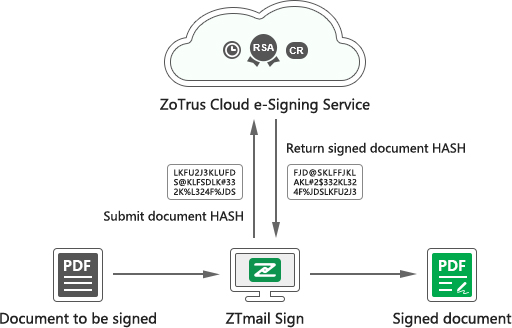
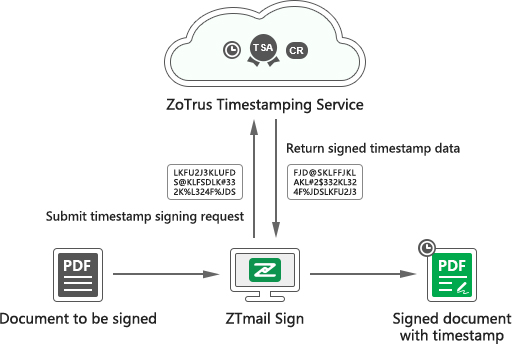
| ZTmail Sign and ZT Browser UI | Adobe Reader and Acrobat UI | |
|---|---|---|
| MV Identity |  | |
| IV Identity |  |  |
| OV Identity |  |  |
| SV Identity |  |  |
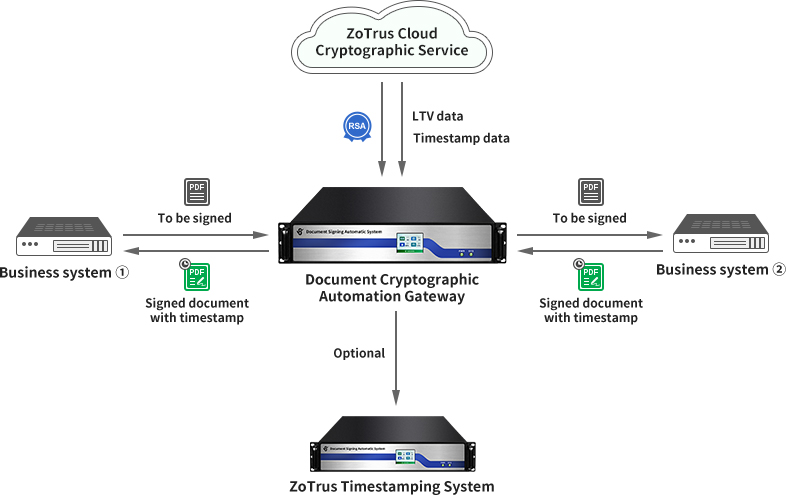
The document starts by email. The identity comes from the user's certificate. The signature stays with the document. Access can be protected with encryption. Validation remains possible outside the original signing workflow. And at enterprise scale, the same cryptographic operations can be automated by Gateway.
| Product | Core Question | ZTmail Capability |
|---|---|---|
| ZTmail App | Who sent this email? Who can read it? | Trusted identity + signing + encryption + validation |
| ZTmail Chat | Who am I talking to? Who can read it? | Trusted identity and encryption carried into conversation |
| ZTmail Sign | Who signed this document? Who can read it? | Digital signature + trusted identity + document encryption + timestamping |
| ZTmail Gateway | How can an organization automate it? | Centralized cryptographic signing + encryption + timestamping + certificate automation |
ZTmail Sign is built on the same cryptographic foundation as ZTmail App, ZTmail Chat, complete digital signatures, encryption, trusted identities, and certificate automation all in the same business workflow.