Webmail vs. Email Client: Which Is More Secure?
August 13, 2026
Please indicate when reprinting: Reprinted from ZoTrus CEO Blog)
There are many articles on this topic, and the consensus is that both have their advantages and serve different use cases. Users need both webmail and email clients. This article takes a different angle, exploring what qualities an ideal email client should possess.
1. What is an email client? What is webmail? What are their pros and cons?
Let's start with email clients because email history begins with them. When email was first created, it used dedicated client software to send and receive messages. Email was the first application on the Internet, and web services did not yet exist.
Email clients use POP3/IMAP protocols to retrieve emails from mail servers and SMTP to send them. They also provide mail management, contact management, and other services. They allow users to read and compose emails offline and store them locally. The first email client was written by Larry Roberts in 1972, featuring a list of emails with options to select, forward, and reply. The first graphical email client was Eudora, written by Steve Dorner in 1988. Today, commonly used email clients include Microsoft Outlook, Apple Mail, Mozilla Thunderbird, and Tencent Foxmail.
Email clients were essential for sending and receiving emails until 1996, when Hotmail emerged as the world's first webmail service. Users could send and receive emails directly through their browsers without any client software, and they got a free @hotmail.com email address. Hotmail quickly went viral, reaching 10 million users in just one year. In 1998, Microsoft acquired it for $400 million and later rebranded it as Outlook.com.
The high point of webmail came when Google launched Gmail on April 1, 2004, offering 1 GB of free storage, which was unprecedented at the time. Gmail remains the world's leading free webmail service today.
Webmail is convenient because every computer and phone has a browser. But it has drawbacks: users cannot read or send emails offline, and they need to log in each time. That is why all webmail providers also offer email clients.
According to the latest third-party statistics, the top four email clients are Apple Mail, Google Gmail, Microsoft Outlook, and Yahoo Mail, with market shares of 53.67%, 30.70%, 4.38%, and 2.64% respectively. Together they account for 91.39% of the market. All other email clients combined make up just 8.61%. Among webmail providers, the rankings are Google Gmail, Microsoft Outlook, Yahoo Mail, and Apple iCloud Mail, with shares of 43%, 19%, 10%, and 8%, totaling 80%.
This shows that the same major companies dominate both the email client and webmail markets. They complement each other, but email clients remain the primary choice. Apple Mail's top ranking reflects the rise of mobile email as a primary need, which has reduced webmail to a fallback option when a client is not available.
2. What is email's core security challenge and what remains unsolved?
Webmail and email clients are two different ways of using email, but webmail essentially uses a browser as its client. The differences are using a general-purpose client versus a dedicated one, and processing email in the cloud versus on the user's device.
"Is webmail or an email client more secure?" is not a useful question. Email security is not determined by the client.
The core security of email is how to protect content during transmission and when stored on cloud mail servers. This is what we call "in-transit security" and "in-cloud security." In-transit security is already addressed by TLS encryption, which protects emails whether sent via webmail or an email client. Any email service that does not support TLS encryption, including TLS IMAP and TLS SMTP, is simply inadequate.
In-cloud security, which means whether emails are stored encrypted on the mail server, remains an unsolved problem globally. Email providers often claim they take measures, but unless emails are stored in encrypted form, those claims are just promises. Plaintext emails cannot be truly secured by any other means.
Although various email encryption solutions exist and popular clients support S/MIME certificates, adoption remains low due to complexity. As a result, most emails are still stored in plaintext on cloud servers, and many webmail providers rely on reading email content to serve targeted ads. This is a major reason that users are reluctant to rely solely on free webmail services.
The key challenge is achieving widespread end-to-end email encryption. Only then can we ensure both in-transit and in-cloud security and effectively prevent email fraud and BEC attacks. S/MIME is a reliable technology for this purpose, but like HTTPS requires SSL certificates, S/MIME requires users to purchase and apply for email certificates from CAs, manually configure them in supported clients, and exchange public keys with recipients. This cumbersome, costly, and time-consuming process prevents mass adoption.
3. Three major pain points of traditional email clients
Given that email clients are the mainstream tool for handling email, and S/MIME is a reliable end-to-end encryption technology, why has encrypted email not become widespread? The root cause lies in three major pain points:
- Pain point one: certificate application and configuration are extremely complex. Users need to apply for an S/MIME certificate from a CA, verify their identity, download the certificate, and manually configure it in their email client. This process deters 99.99% of users.
- Pain point two: public key exchange is difficult. Before sending an encrypted email, the sender and recipient must exchange public key certificates in advance. This is essentially an "encryption preparation" step before the actual encrypted communication, which significantly increases the barrier.
- Pain point three: key management is cumbersome. Certificates expire and need renewal. Switching devices require reconfiguration. Losing a private key means permanently losing access to all encrypted emails. These management burdens are too heavy for average users.
4. The ideal email client: automated, standardized, intelligent
Based on the above analysis, an ideal email client should have three core qualities:
- Automated: email certificates automatically provisioned, public key exchange automated, key management automated, certificates automatically renewed. Users do not need to understand any technical details. Encryption becomes the default behavior.
- Standardized: based on S/MIME international standards and national cryptographic standards, seamlessly interoperable with global mainstream clients like Outlook, Thunderbird, and Apple Mail. No vendor lock-in, no silos.
- Intelligent: freely integrate with AI models to enable email summarization, smart drafting, and automatic classification. AI becomes a powerful assistant for email processing.
5. ZTmail: removing the barriers to encrypted email
ZTmail is the world's first email client built on these principles, offering automated encryption and bring-your-own AI.
Automated certificate provisioning: users click "Apply for Certificate" in Settings, and the system automatically requests and configures an RSA S/MIME certificate. Users with national cryptographic compliance needs can optionally apply for SM2 algorithm S/MIME certificates. Keys are generated locally, and private keys never leave the user's device.
Automated public key exchange: when sending an encrypted email, the system automatically queries the certificate directory service to retrieve the recipient's public key certificate. No manual key exchange is required.
Automated key management: keys are generated and stored locally, supporting one-click encrypted export to the user's own mailbox for safekeeping, and one-click import for restoration. Users have full control over their keys.
Bring-your-own AI: users freely choose their AI model, bring their own API key, and the AI assistant works for them. Email summarization, smart drafting, automatic classification, all under the user's control.
Encryption certificates and signing certificates, each with their own role: ZTmail configures two types of certificates for each email. Encryption certificates are used solely for encryption and decryption, ensuring content security. Signing certificates determine the identity level recipients see, and the higher the identity level, the higher the trust.
One encrypted email, both ZTmail and Outlook can read it: users can manually export the email certificate automatically configured by ZTmail and install it into the Windows certificate store. Outlook can then automatically decrypt emails encrypted by ZTmail. This is a unique cross-client seamless experience offered by ZTmail.
ZTmail's innovative UI design uses clear icons to display the encryption status, encryption algorithm, digital signature, and sender identity information for every email. The identity levels are T1 Mailbox-Validated, T2 Individual-Validated, T3 Organization-Validated, and T4 Sponsor-Validated. The higher the identity level, the higher the trust.
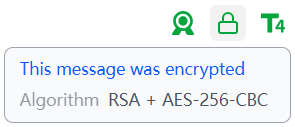
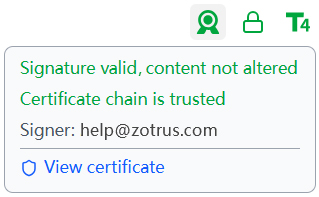
Free automated provisioning of email certificates, automated end-to-end email encryption. Removing the barriers to email encryption for everyone.
ZTmail, S/MIME Encryption for Everybody, automated. AI, your key.