1. Service Overview
ZTmail Sign is a document cryptographic application automation service built around the email workflow. Instead of directing users from email to a separate signing platform, it enables documents to be signed, signer identities confirmed, documents encrypted, and signatures verified within the existing email communication environment.
The idea is simple: the document is already in email, so why leave email to sign it? Both local signing and cloud signing are supported.
2. How ZTmail Sign Document Cryptographic Application Automation Works
ZTmail Sign uses the ZTmail App to automate all certificate management and cryptographic operations for individuals and small and midsize businesses. Every user needs to download and install the ZTmail App. Medium and large organizations that need to automatically sign large volumes of PDF documents can instead deploy the ZTmail Document Cryptographic Application Automation Gateway, which automates document certificate management and all cryptographic operations.
Everything happens automatically in the background. Users only need to click “Apply for Document Certificate.” This authorizes the automated process; it is not an additional manual task. Start with one click, and the system does the rest.
3. Three Product Editions
ZTmail Sign documents cryptographic application automation service offers three product editions to meet different user needs. Choose an edition, and the system automatically configures the corresponding document certificates.
Employee Trusted Identity (SV)
T4 icon, “Sponsor Validated”, displaying the person’s name, organization name, and country abbreviation
Paid SV service (starting at US$ 9) tells document readers that the signer is an organization employee. It automatically configures an SV identity certificate.
The edition determines the certificate, and the certificate is configured automatically. The General Edition provides free document cryptographic application automation for mailbox identity. Users can choose a paid service based on how they want their identity displayed, compatibility with external PDF readers, and their trust-domain requirements. After an edition is selected, ZTmail App automatically applies for, configures, and renews the corresponding certificates. Service terms of 1–5 years are available, although a document certificate can be valid for no more than 2 years. If the service term exceeds 2 years, the certificate is automatically renewed at no charge before it expires. Identity validation levels T1 / T2 / T3 / T4 answer “How is the document signer’s identity presented?” Product models D1/D2/D3 answer “Which trust architecture is used, and how does it balance identity display in ZTmail App with compatibility across the external document ecosystem?”
4. General Edition — Two Products
This broadly accessible edition is available to users worldwide and provides complete document cryptographic application automation, including free automated application for and use of MV document certificates. Depending on their environment and interoperability needs, users can choose RSA and/or SM2 document certificates, with the corresponding digital signing, encryption, certificate compatibility, and trust-domain configuration.
Download ZTmail App for free and add an email account. Then, under “Settings” > “Certificates,” click “Apply for Document Certificate”. The App automatically verifies the mailbox, applies for the certificate, retrieves the issued certificate, and deploys it for use. MV document certificates are completely free and trusted within the ZTmail ecosystem. PDFs signed with a free MV document certificate display the T1 identity level and the signer’s email address in ZTmail App. However, Adobe Reader displays “signature is invalid” when opening these PDFs, so this option is intended for use within the ZTmail ecosystem. This is the completely free MV-D1 product. For Adobe global trust, users can purchase MV-D2, a globally trusted cloud document-signing service that includes 10 cloud-signing operations. It uses an Adobe-trusted cloud-signing platform certificate to provide an e-signature service like Adobe Sign and DocuSign; Adobe Reader trusts the signature and displays the platform signing information.




- Automatically configures an MV document certificate
- ZTmail App displays signer’s email address
- Adobe Reader displays “signature is invalid”
- Automatically configures an MV document certificate + 10 global-trusted cloud-signing operations
- ZTmail App displays “ZoTrus Document Security Cloud Service”
- Adobe Reader displays “Certified by ZoTrus Document Security Cloud Service”
You are paying for “global interoperability” and “certificate automation,” not just a document certificate. The system uses automated, tamper-evident digital signatures to present the signer’s trusted identity to document readers. Once a product is selected, ZTmail App automatically applies for and configures the corresponding document certificate. Users with an MV identity can also upgrade by purchasing document cryptographic application automation for a personal or organizational identity. The same mailbox can hold MV/IV/OV/SV identities simultaneously, allowing users to choose the identity that best fits each document-signing need.
5. Personal Edition — Three Products
This edition is for individuals worldwide who want to present a personal identity. It provides complete document cryptographic application automation, including automated application for and use of IV document certificates. When ordering, users can choose RSA and/or SM2 document certificates. If they initially choose only RSA, they can apply for an SM2 certificate later at no additional cost, and vice versa.
If you have not yet downloaded and installed the ZTmail App before placing your order, download it first and apply for a free MV document certificate, which will be used for document encryption. Choose from three service editions: IV-D1, ZTmail Trust, automatically configures an IV signing certificate trusted within the ZTmail ecosystem. PDFs signed with it display a T2 trusted identity level: ZTmail App shows the person’s name and country abbreviation, while Adobe Reader displays “signature is invalid”. IV-D2, Global Trust, uses a document certificate issued by an Adobe-trusted CA. Adobe Reader displays the signer’s personal name for a certified signature, or indicates that the signature is valid for a standard signature. IV-D3, Hybrid Trust, automatically configures a ZTmail-trusted IV document certificate and 10 cloud-signing operations under Global Trust. Adobe Reader displays the platform signing information without an invalid-signature warning.


- Automatically configures an IV document certificate
- ZTmail App displays personal identity
- Adobe Reader displays “signature is invalid”
- Automatically configures an IV document certificate
- ZTmail App displays personal identity
- Adobe Reader displays the signer’s personal name
- Automatically configures IV document certificate + 10 global-trusted cloud-signing operations
- ZTmail App displays personal identity
- Adobe Reader displays “Certified by ZoTrus Document Security Cloud Service”
Please note: For D1 and D3, identity validation is performed by an independent professional identity verification provider selected by ZoTrus Technology, either directly or through an automated identity-verification interface. For D2, identity validation is performed by an international CA selected by ZoTrus Technology. ZTmail App does not store users’ identity-verification supporting documents.
You are paying for “the ability to present an identity,” “global interoperability,” and “certificate automation,” not just a document certificate. The system uses automated, tamper-evident digital signatures to present the signer’s trusted identity to document readers. After a product is selected, ZTmail App automatically applies for and configures the corresponding document certificate. Once personal identity validation is complete, users who purchase the Employee Edition do not need to repeat personal identity validation.
6. Organization Edition — Organization Identity — Three Products
This edition is for organizations worldwide that want to present their organization identity. It provides complete document cryptographic application automation, including automated application for and use of OV document certificates. When ordering, users can choose RSA and/or SM2 document certificates. If they initially choose only RSA, they can apply for an SM2 certificate later at no additional cost, and vice versa. This edition does not require validation of an employee’s identity; it only validates control of the organization’s email address.
If you have not yet downloaded and installed the ZTmail App before placing your order, download it first and apply for a free MV document certificate, which will be used for document encryption. Choose from three service versions: OV-D1, ZTmail Trust, automatically configures an OV signing certificate trusted within the ZTmail ecosystem. PDFs signed with it display a T3 trusted identity level: ZTmail App shows the organization name and country abbreviation, while Adobe Reader displays “signature is invalid”. OV-D2, Global Trust, uses a document certificate issued by an Adobe-trusted CA. Adobe Reader displays the signer organization’s name for a certified signature, or indicates that the signature is valid for a standard signature. OV-D3, Hybrid Trust, automatically configures a ZTmail-trusted OV document certificate and 10 cloud-signing operations under Global Trust. Adobe Reader displays the platform signing information without an invalid-signature warning.


- Automatically configures an OV document certificate
- ZTmail App displays the organization identity
- Adobe Reader displays “signature is invalid”
- Automatically configures an OV document certificate
- ZTmail App displays the organization identity
- Adobe Reader displays the signer’s organization name
- Automatically configures an OV document certificate + 10 global-trusted cloud-signing operations
- Global-Trusted Document Cloud Signing Service
- ZTmail App displays the organization identity
- Adobe Reader displays “Certified by ZoTrus Document Security Cloud Service”
Please note: For D1 and D3, identity validation is performed by an independent professional identity verification provider selected by ZoTrus Technology, either directly or through an automated identity-verification interface. For D2, identity validation is performed by an international CA selected by ZoTrus Technology. ZTmail App does not store users’ identity-verification supporting documents.
You are paying for “the ability to present an identity,” “global interoperability,” and “certificate automation,” not just a document certificate. The system uses automated, tamper-evident digital signatures to present the signer’s trusted identity to document readers. After a product is selected, ZTmail App automatically applies for and configures the corresponding document certificate. Users can later purchase an Organization Employee Identity product without revalidating the organization, but the employee’s personal identity must be validated.
7. Organization Edition — Organization Employee Identity — Three Products
This edition is for organizations worldwide that want to present both the organization’s identity and the employee’s personal identity. It provides complete document cryptographic application automation, including automated application for and use of SV document certificates. When ordering, users can choose RSA and/or SM2 document certificates. If they initially choose only RSA, they can apply for an SM2 certificate later at no additional cost, and vice versa. This edition requires validation of the employee’s personal identity.
If you have not yet downloaded and installed the ZTmail App before placing your order, download it first and apply for a free MV document certificate, which will be used for document encryption. Choose from three service editions: SV-D1, ZTmail Trust, automatically configures an SV signing certificate trusted within the ZTmail ecosystem. PDFs signed with it display a T4 trusted identity level: ZTmail App shows the employee’s name, organization name, and country abbreviation, while Adobe Reader displays “signature is invalid”. SV-D2, Global Trust, uses a document certificate issued by an Adobe-trusted CA. Adobe Reader displays the signer’s name and organization name for a certified signature, or indicates that the signature is valid for a standard signature. SV-D3, Hybrid Trust, automatically configures a ZTmail-trusted SV document certificate and 10 cloud-signing operations under Global Trust. Adobe Reader displays the platform signing information without an invalid-signature warning.


- Automatically configures an SV document certificate
- ZTmail App displays personal and organization identity
- Adobe Reader displays “signature is invalid”
- Automatically configures an SV document certificate
- ZTmail App displays personal and organization identity
- Adobe Reader displays the signer’s personal and organization name
- Automatically configures an SV document certificate + 10 global-trusted cloud-signing operations
- ZTmail App displays personal and organization identity
- Adobe Reader displays “Certified by ZoTrus Document Security Cloud Service”
Please note: For D1 and D3, identity validation is performed by an independent professional identity verification provider selected by ZoTrus Technology, either directly or through an automated identity-verification interface. For D2, identity validation is performed by an international CA selected by ZoTrus Technology. ZTmail App does not store users’ identity-verification supporting documents.
You are paying for “the ability to present an identity,” “global interoperability,” and “certificate automation,” not just a document certificate. The system uses automated, tamper-evident digital signatures to present the signer’s trusted identity to document readers. After a product is selected, ZTmail App automatically applies for and configures the corresponding document certificate. After purchasing an Organization Employee Identity product, users can add employee identities for multiple mailboxes under the same domain, or purchase an Organization Identity product, without repeating organization identity validation.
8. Seven Core Advantages of ZTmail Sign
- One-Click Signing of Email Attachments: Sign the document where it already is. Right-click a PDF attachment to use the user’s configured document signing certificate to create a digital signature, without uploading the document to a separate e-signature platform.
- Keep E-Contract Signing in the Email Workflow: Discuss terms, exchange versions, confirm the final PDF, sign, send, and continue the conversation in the same email thread. The completed contract can also be stored as an encrypted email attachment in the user’s own mailbox rather than on a signing platform.
- Sign with User’s Own Identity Signing Certificate: The signature is tied to the user’s own certificate-backed identity. For formal organizational documents, a validated organization identity can establish the trusted organizational identity associated with the signed document.
- Display Trusted Identity in the Signed Document: The ZTmail App and ZTmail browser can display the validated signer’s identity as a T1 / T2 / T3 / T4 Trusted Identity indicator. The signature becomes more than the result of a cryptographic operation, it becomes an identity signal people can understand.
- Encrypt Documents and Control Who Can Read Them: PDFs can be encrypted for one or more authorized readers using document encryption certificates. Each authorized user can decrypt the document with their own private key, so no shared document password is needed. Authorized readers can open and read encrypted documents through ZTmail App and Adobe Reader as part of a seamless workflow; unauthorized readers cannot open them.
- Add a Trusted Timestamp to Support Long-Term Signature Validity: A trusted timestamp adds verifiable time information to a signed document, helping establish when the signature existed and supporting long-term validation (LTV) of the signed document.
- Cloud signing service doesn’t require uploading documents: ZTmail Sign supports local signing while also offering a fundamentally different cloud signing method: the original document always stays on your device, no uploading needed. ZTmail App only sends the HASH of the document to the cloud signing service to complete the digital signature and timestamp, while the actual digital signature is done locally by ZTmail App.
9. Technical Architecture
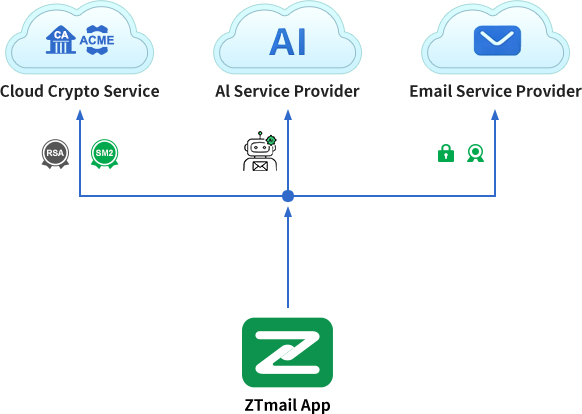
A client-cloud integrated Zero Trust architecture that minimizes client dependence on cloud services:
- Private keys never leave the device: Keys are generated locally by the client, which submits only a CSR to apply for a certificate. The private keys never leave the device.
- Automated certificate issuance: After the ZTmail Cloud CA System receives the user’s certificate signing request (CSR), it sends a verification code to the user’s mailbox. ZTmail App intelligently identifies the verification email and automatically submits the code to the ACME server, enabling automated issuance of document certificates using both RSA and SM2 algorithms.
- Automated retrieval and deployment: ZTmail App automatically retrieves issued certificates and deploys them for use.
- Everyday cryptographic operations: Digital document signing, encryption, decryption, signature verification, and timestamp signing are integrated into the email workflow. Users do not need to learn cryptography. They can also use the “Document” menu to manage digital signing and encryption of PDF files on their local device independently.
- Cloud-signing operations: The document to be signed remains on the local device. ZTmail App submits only the document’s HASH to the cloud signing service for digital signing and timestamp signing, then completes the digital signature locally in ZTmail App.
- Automated key management: The user’s private keys are encrypted and stored on the user’s own device, with an encrypted backup in the user’s own mailbox. Organizations that need centralized key management can purchase the ZTmail Enterprise Key Management System (EKMS). Keys are generated and managed in EKMS, and ZTmail App retrieves employees’ certificate keys from EKMS for use on their local devices.
- User-controlled backup and recovery: User’s sensitive data, including certificate private keys, contacts, calendar entries, and tasks, is automatically encrypted and backed up to the user’s own mailbox, then manually synchronized to ZTmail App on other devices. Users must safeguard their recovery key and follow the recovery process to restore backup data on another device.
10. Get Started
You don’t need to understand certificates. Just choose the service that fits your needs.
- All users can choose the fully featured General Edition at no cost; the only difference is the certificate trust domain.
- Individual users → Choose the Personal Edition to automate encryption and display a trusted personal identity.
- Organizations → Choose the Organization Edition if employee identity validation is not required, or the Organization Employee Edition if employee identity validation is required.
- Medium and large organizations → Deploy the ZTmail Document Cryptographic Application Automation Gateway to automate digital signing and encryption of business documents in bulk.
Download ZTmail App for Free | Learn About the Document Cryptographic Application Automation Gateway